High-fidelity adult sandbox for detailed character design and animation
Virt-U-Mate, from Entropy Digital Entertainment, is a sandbox simulation focused on creating and interacting with highly detailed 3D adult characters. The app provides morph-based customization, joint controls, and real-time soft-body and cloth physics so creators can pose, animate, and save scenes. Dual VR and Desktop modes enable immersive sessions or precise editing workflows, making it suited to adult creators and technical sandbox enthusiasts seeking fine-grained control.
What kind of simulation is the app?
Step into a private virtual studio where edits change how characters respond and interact. So, the app operates as a high-fidelity sandbox simulation and character-creation tool driven by physics, aimed at producing realistic interactions in an adult-focused environment. Typical work flows follow a simple creative loop:
- design morphs and skin detail
- pose and animate using joint controls
- fine-tune physics responses and save scenes
Does it support VR and Desktop modes?
The app supports both immersive headset sessions and a Desktop editing mode, giving creators two interaction paths. VR compatibility is stated for major headsets, while Desktop mode provides precise controls for sculpting and animation. Entropy recommends hardware with dedicated graphics to handle live soft-body and cloth computations, so players should plan a capable setup if they expect real-time simulation during lengthy editing or playback.
What does the app look and feel like in action?
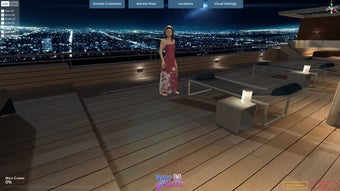
Visual focus centers on anatomically detailed characters and responsive materials: morph-driven faces and bodies, realistic skin textures, hair simulation, and dynamic cloth that reacts to movement. Lighting and modular scene assets let creators stage setups with directional or ambient adjustments. Thus, the visible outcome leans toward photorealism within a studio-like scene, where physics determine secondary motion and collisions rather than hand-animated approximations.
Is it hard to get started?
Expect a noticeable learning curve, as reported by users comparing it to other advanced 3D simulation tools. The developer targets creators and animators who accept technical depth in return for control, so newcomers may face an initial period of experimentation before producing polished scenes. Community notes highlight that patience and familiarity with joint/pose systems shorten setup time and improve animation results.
A focused workshop for technically minded creators, not a casual toy
The app is a pragmatic choice for creators who prefer meticulous, consequence-driven editing and who invest time learning technical tools. It rewards careful experimentation and long-form scene work, but it requires a commitment to mastering its systems and patience for complex setups. For artists comfortable with detailed 3D toolchains, the app offers a capable creative workshop; casual users should expect a steeper entry path.